Table of Contents
The Best Android TV Box
Our Pick, Best Mid-Range
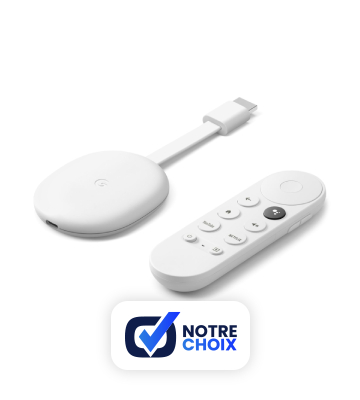
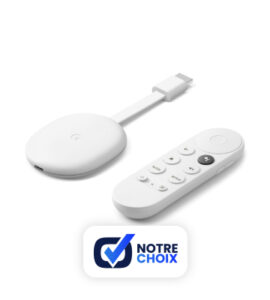
Google Chromecast with Google TV
The latest version of the Chromecast finally behaves like a real Android TV box, taking full independence. This, combined with its many other qualities, therefore makes it a particularly recommendable solution.
The Chromecast with Google TV is, in our opinion, the best solution to enjoy Android on your TV. It is compatible with 4K HDR and connects via HDMI. It is designed to take advantage of all your streaming services, whether audio or video, within a dedicated interface allowing you to directly access catalogs without having to switch from one to another. It of course includes the original Chromecast function, as on the previous generation. The latter remains a viable solution but it is dependent on a device used for broadcasting (smartphone, tablet, etc.).
Best cheap
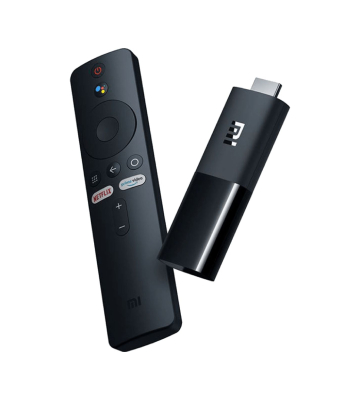
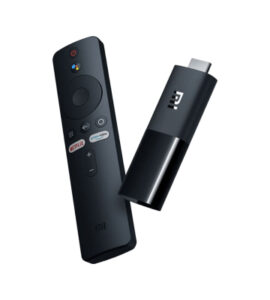
Xiaomi Mi TV Stick
This model is a basic but convincing solution for those who wish to evolve their outdated TV into the modern era. It gives you access to Android TV in FHD 60 fps, for a very affordable price.
The Mi TV Stick is a big USB key including everything you can expect from an Android Box. It therefore allows you to access all the streaming services available on this operating system, without depending on another device (unlike the 3rd generation Chromecast, offered at the same price). However, it remains quite limited, which only allows a display in FHD 60 fps and prohibits any pretension to the game. Access to local content can be done via the local network. A 4K compatible version is also available, the MiBox S.
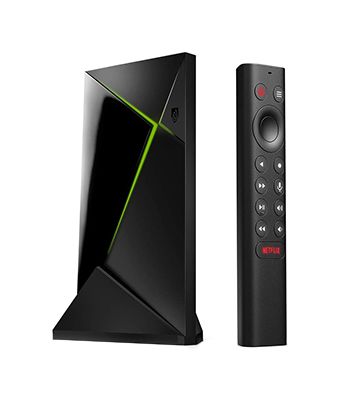
Nvidia Shield TV Pro
This model allows you to play many video games on the Internet or from the game library of your PC. This is the most complete Android box in our comparison. It is aimed at people who want to make the most of it.
The Shield TV Pro takes everything you would expect from a product in this price range, which makes it particularly attractive. With its two USB 3.0 ports, its compatibility with Dolby Atmos or the fact of being able to stream games from its own Steam library or online via Nvidia’s servers, the Nvidia Shield TV Pro constitutes a complete Android box dedicated to the most remote users. more demanding. A deflated version, the Shield TV offers a similar experience but skips the USB ports and SmartThings and Plex compatibility while reducing its storage and the amount of RAM memory.
our selection
| Our Pick, Best Mid-Range | Best cheap | Best high end |
|---|---|---|
 |
 |
|
| Google Chromecast with Google TV | Xiaomi Mi TV Stick | Nvidia Shield TV Pro |
| The latest version of the Chromecast finally behaves like a real Android TV box, taking full independence. This, combined with its many other qualities, therefore makes it a particularly recommendable solution. | This model is a basic but convincing solution for those who wish to evolve their outdated TV into the modern era. It gives you access to Android TV in FHD 60 fps, for a very affordable price. | This model allows you to play many video games on the internet or from the game library of your PC. This is the most complete Android box in our comparison. It is aimed at people who want to make the most of it. |
| CHECK PRICE | CHECK PRICE |
Honorable mentions
At the moment, no product available on the European market seemed to us to have the qualities necessary to appear alongside our main selection. We will be sure to offer you interesting alternatives as soon as we know about them.
How to choose your Android TV box?
In summary, an Android TV box allows you to have services similar to those of a Smart TV on a more basic television. It allows you to download applications or enjoy various audio or video streaming services. Some high-end models also allow you to play video games.
In order to understand what distinguishes a good Android box, here is a list of criteria to take into account:
- The designs : the majority of Android boxes offer a homogeneous design, namely a thin black rectangle. As this is an object that will be enthroned near your television, this is a point not to be overlooked. However, some models offer a very different aesthetic because it is in particular possible to add hard disks to increase their storage space. Of course, the level of finish varies according to the price range.
- The remote control : this is an essential element for the functioning of the Android box. How many shortcut keys does it have to facilitate its daily use? Is it easy to learn? Does she have a microphone to use Google Assistant? Some Android boxes also provide joysticks to play video games or more easily control the Android box.
- Performances : this goes from the fluidity in the menus of Android boxes to the playback of 4K quality videos, including responsiveness in the middle of a video game. Some models offer something to improve the image (including handling HDR signals), others offer sound options such as Dolby Atmos to immerse yourself more easily in a movie with a home cinema.
- Connectivity : if the Android boxes all have Wi-Fi, some have an Ethernet port ensuring better stability of the Internet connection. The number of USB ports is also to be taken into account since you can connect USB keys and external hard drives to read their media from your Android box and thus increase their storage capacity.
Sources
- Android Authority, The best Android TV boxes of 2021 you can get, September 13, 2021
- Android Central, Best Android TV Boxes in 2021, September 13, 2021
- Clubic, Best Android TV Box - 2021 Comparison, September 13, 2021
- CNet France, The best Android TV boxes and multimedia boxes of April 2021, September 13, 2021
- Frandroid, TV box: which multimedia box to choose for Netflix, Plex or Canal +?, September 13, 2021
- Techradar, Best Android boxes in 2021: for TV, gaming, and everything else, September 13, 2021